Missed lead
A quote request arrives while the owner is busy. Frontroom surfaces it, drafts the next question, and schedules the follow-up.
Frontroom reviews one revenue leak, builds a private business context pack, drafts the next reply, watches the follow-up gap, and keeps the owner in control before anything goes out.
150 guests. Saturday evening. Quote request sat unanswered for 19 hours.
150 guests, Saturday evening, buffet interest, no confirmed venue.
Venue, service style, allergies, and deposit timing need confirmation.
Draft asks the right questions without promising availability or price.
Menu notes, event FAQ, and quote rules used for the draft.
$0.18 estimated for draft plus follow-up schedule.
Frontroom gives that work a place to land before leads go stale, promises get fuzzy, or deadlines slip.
A quote request arrives while the owner is busy. Frontroom surfaces it, drafts the next question, and schedules the follow-up.
A prospect has not replied. Frontroom watches the gap and proposes a polite check-in from the approved tone.
A staff or vendor detail changes. Frontroom shows the source, the risk, and the owner decision needed next.
The review should make the product obvious: a messy lead becomes a safe owner-ready reply, proof trail, and follow-up plan before a paid pilot is quoted.
The free workflow review turns vague follow-up pain into a simple operating decision: where the lead waits, what it may cost, and what proof a 30-day pilot has to produce.
Pick one workflow and estimate how often leads wait: quotes, deposits, booking questions, reminders, or handoffs.
Use the average booking, job, or order value so the pilot is tied to revenue risk instead of a generic AI subscription.
The pilot should recover or protect one visible workflow while keeping replies owner-approved and spend capped.
Not a guarantee. It is the filter that decides whether a paid Frontroom pilot is worth quoting.
Five jobs, one owner-approved loop.
Daily and on-demand view of decisions, leads, risks, and opportunities.
Uses approved business context to answer owner and staff questions.
Creates replies, tasks, checklists, and handoffs in your voice.
Tracks follow-ups, deadlines, channel health, and spend caps.
Shows source, confidence, missing info, approval mode, and cost.
Frontroom is not a loose chatbot prompt. The setup creates a private context pack, approval rules, one follow-up routine, a spend cap, and a source trail the owner can inspect.
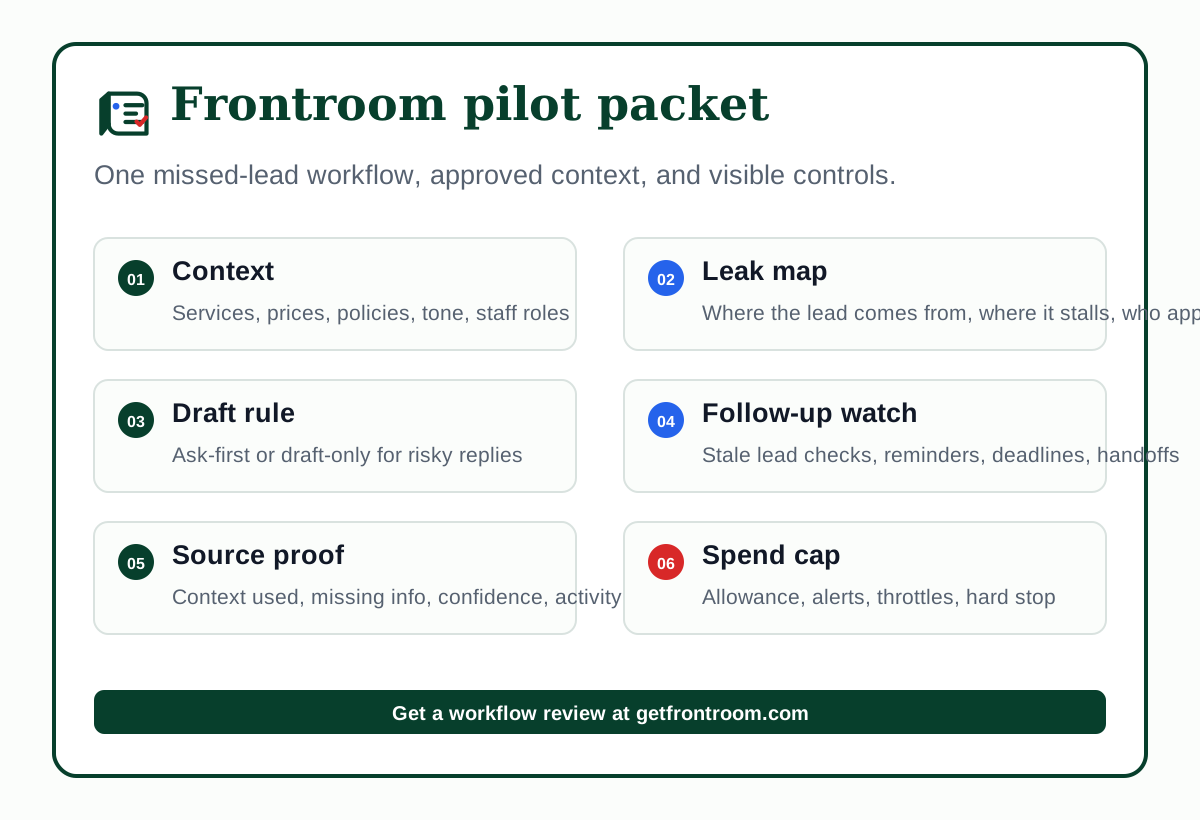
The review looks for one missed-lead loop that can be measured in 30 days.
A 150-guest event lead lands in email while the owner is on a job. Nobody knows if the date, venue, menu, or deposit window is complete.
The operator reads approved context, flags missing details, drafts a safe reply, and schedules the next touch if no answer comes back.
The owner sees the source, cost, draft, and follow-up time before anything is sent. The lead no longer depends on memory.
The owner chooses a simple cost model during onboarding. Frontroom keeps the details visible and blocked from the public form.
Start with a capped managed AI allowance when speed matters more than provider setup.
Use an approved provider key after private setup, with limits and no keys submitted through the website.
Alerts, throttles, and hard stops are part of the setup so the bill cannot drift quietly.
Frontroom should prove one revenue workflow before it expands across the business.
Owner-run teams where leads, quotes, bookings, or follow-ups already create measurable revenue leakage.
Teams looking for fully autonomous public messaging, phone answering, or an unsupervised chatbot on day one.
Surface real follow-ups, reduce draft editing, stay inside spend caps, and recover at least one clear workflow.
Frontroom is sold as setup plus operational relief, not an empty tool. The review identifies one missed-lead workflow worth fixing. The first paid pilot proves whether the operator can recover follow-ups and reduce owner load without unsafe automation.
Start where missed follow-up costs money.
Quote details, menus, dates, venues, deposits, and prep handoffs.
Estimates, appointment questions, job updates, and after-service check-ins.
Booking requests, waitlists, reschedules, and policy-sensitive replies.
Lead qualification, proposal follow-up, deadline tracking, and staff assignments.
Frontroom should make the owner faster without making the business reckless.
Draft-only, ask-first, approved routine, or blocked. Risky external actions wait for approval.
Replies and recommendations show the context used, confidence, missing information, and activity log.
Usage caps, alerts, and stop behavior keep AI cost visible instead of buried in the stack.
The public form is for pilot fit only. Credentials, customer records, and channel access move through private setup.
Customer-facing WhatsApp or similar messaging waits for official setup and compliance review.
Frontroom supports decisions. It does not replace staff, promise revenue, or send risky messages on its own.
Tell us where follow-up is slipping. We will review fit for free, define the first business job, and propose a draft-first paid pilot only if the use case is clear.